
🦆 Duck Hunt
VORP RSG TPZ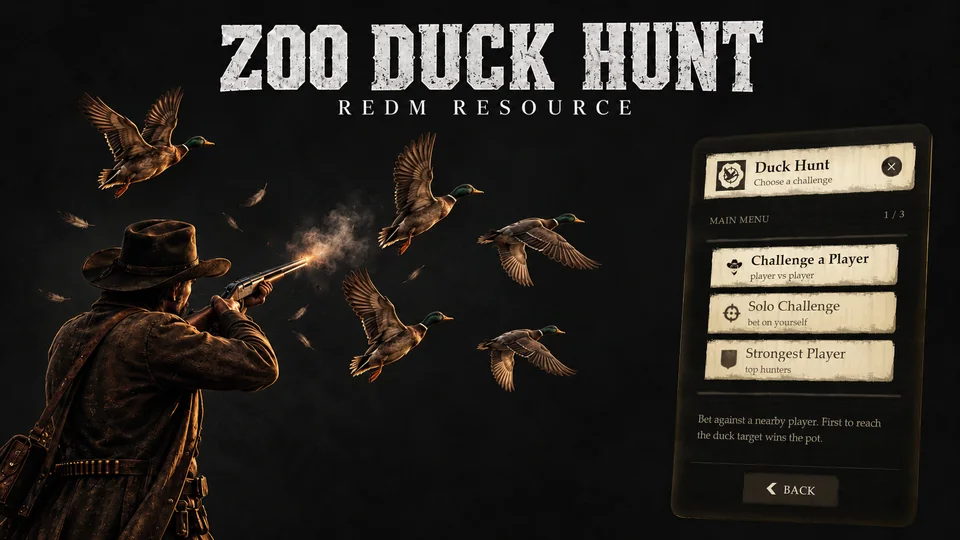
🆓 Get it free on zoo-scripts.com
A polished duck-hunting challenge for RedM: bet against another player, or bet on yourself. It has a hand-crafted RDR2-styled UI, a database-backed records leaderboard, anti-grief isolation and optional Discord logging.
Features
- Player vs player duels. Challenge a nearby player, set the duration, the duck target and the stake. The winner takes the pot.
- Solo challenge. Pay a stake, hit the duck target in time and win a reward, or lose the stake.
- Custom bet. Players can type their own stake (within configurable bounds), not just pick a preset.
- Multiple locations. Link as many hunter NPCs as you want, each with its own arena. Players use the nearest one.
- Records leaderboard. Kept in MySQL: each player's best run (most ducks in a run, and the time it took), shown as
12 ducks · 0:47. - Anti-grief isolation. Duels and solo runs happen in a private routing bucket, so no outsider can see or interfere. In a duel, if a player kills their rival, the killer forfeits and the victim takes the pot.
- Server-authoritative. Scores, bets, distances and locations are all validated on the server. It never trusts the client.
- Discord webhook. Optional logging of every match and solo result.
- Built-in version checker and resource-name lock.
Requirements
The script finds whichever of the three is running on its own. Name yours in Config.Framework only if you keep a second one installed but stopped.
Installation
Drop the
zoo_duckhuntfolder into yourresourcesdirectory.Make sure the folder is named exactly
zoo_duckhunt, because the resource is name-locked.Ensure it in your
server.cfg, after your framework:iniensure oxmysql ensure vorp_core # or rsg-core, or tpz_core ensure zoo_duckhuntThe order is not critical, because the script waits for the framework either way. Listing it after keeps the startup log clean.
Start the server. The leaderboard table (
zoo_duckhunt_leaderboard) is created automatically on first run, so no manual SQL import is needed.
Configuration
All settings live in config.lua. UI text lives in locale.lua.
Locations
Each location links one hunter NPC to its own two stand spots. Copy a block to add a place:
Config.Locations = {
    {
        npc   = vector4(-2537.22, -1421.21, 145.85, 71.32),   -- hunter NPC: x, y, z, heading
        spots = {
            vector4(-2542.46, -1423.70, 145.76, 152.85),       -- player 1 (challenger / solo)
            vector4(-2544.64, -1422.29, 145.69, 133.85),       -- player 2 (opponent)
        },
    },
}
Betting (PvP)
Config.Bet = {
    enabled     = true,
    default     = 25,
    options     = { 10, 25, 50, 100 },   -- presets
    allowCustom = true,                  -- let players type their own stake
    customMin   = 10,
    customMax   = 1000,
}
Solo
Config.Solo = {
    enabled   = true,
    timeLimit = 60,     -- seconds
    isolate   = true,   -- hunt alone in a private world (no griefing)
    challenges = {
        { target = 6,  stake = 10, reward = 25 },
        { target = 9,  stake = 20, reward = 55 },
        { target = 12, stake = 30, reward = 90 },
    },
}
Discord webhook (optional)
Config.Webhook = {
    enabled = false,        -- set true to post results to Discord
    url     = "",           -- your Discord webhook URL
    name    = "Duck Hunt",
    avatar  = "",
}
Leaderboard
The "Strongest Player" menu shows the top 5 runs, pulled from the database.
| Rank | Player | Best run |
|---|---|---|
| #1 | Arthur | 12 ducks · 0:47 |
Ranked by highest score first, then by the fastest time. The data survives server restarts.
Database
Created automatically on start:
CREATE TABLE IF NOT EXISTS `zoo_duckhunt_leaderboard` (
    `identifier` VARCHAR(64) NOT NULL,
    `name`       VARCHAR(64) NOT NULL DEFAULT '',
    `best_score` INT NOT NULL DEFAULT 0,
    `best_time`  INT NOT NULL DEFAULT 0,
    `updated_at` TIMESTAMP NOT NULL DEFAULT CURRENT_TIMESTAMP ON UPDATE CURRENT_TIMESTAMP,
    PRIMARY KEY (`identifier`)
);
How to play
- Walk up to a hunter NPC and hold the interaction key.
- Choose Challenge a Player, Solo Challenge, or view the Strongest Player board.
- Walk to your spot, wait for the countdown, and shoot as many ducks as you can before time runs out.