
🔫 Weapon Customization
VORP RSG TPZ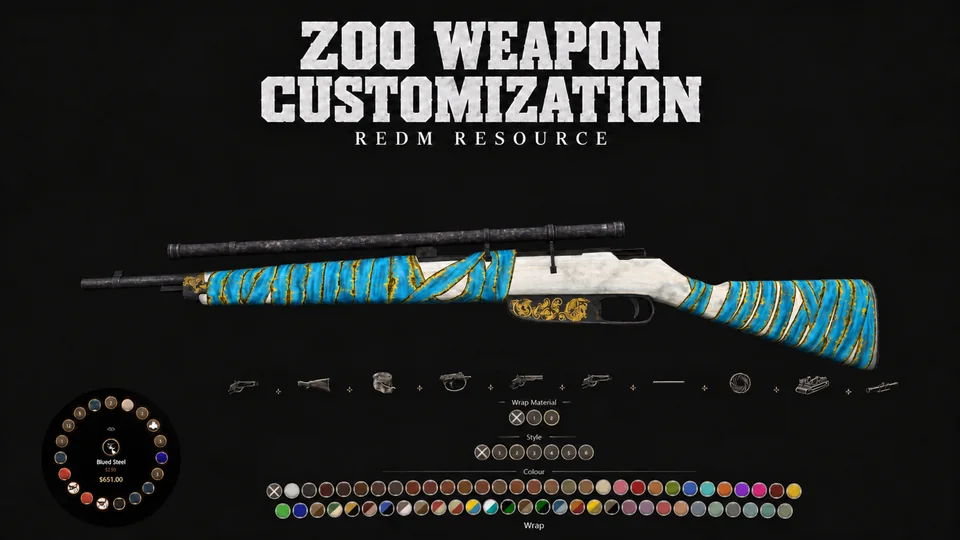
Lay your gun on the gunsmith counter and work on it: parts, metals, engravings and tints, chosen on a live top-down view of the real weapon and kept per serial number.
Features
- The real counter experience. The player lays the weapon down with the game's own gunsmith animation and picks it back up the same way, over a live top-down view of the actual weapon. A woman at the counter does it with the game's own female animation.
- The smith stays at the counter. Once the gun is down the player leans in with both hands on the counter, the way the game's own gunsmith does, and everyone in the room sees that stance.
- 30 weapons catalogued. Pistols, revolvers, repeaters, rifles, shotguns, bows and the hunting knife: the set the game itself customizes, each with its own parts, poses and close-up angles.
- Parts, metals, engravings and tints. Every piece is priced in an open prices file (765 rows). A piece can cost cash, gold, or both. The till charges only what the visit adds, and takes nothing unless the player can cover the whole order.
- Pay with materials. A counter can take items from the satchel instead of money, or both. Each shop says how it is paid, and what every piece takes is listed in an open materials file. See Paying with materials.
- A receipt on screen. After the order, what was taken rolls in at the top right of the screen: each item with its picture, then the money.
- Parts can be put back. Any part goes back to the piece the gun came with, for a price you set or for nothing (
Config.ReturnPrice). - Pictures on the style rows. Wrap patterns, wrap materials and the three scopes show as pictures instead of numbers, and a dot marks the piece the gun came in with.
- Saved per serial number. Every weapon keeps its own look, and it follows the gun through a stash, a trade or a drop. Storage is automatic, there is no SQL file to run.
- The room watches the bench. Players nearby see the weapon on the counter and every part fitted to it, live, as the smith works.
- Walk up and watch. A second prompt at a counter in use gives you the smith's own view of the bench. No menu, no prompt, and the camera does not move. Watching is not work, so the job lists do not gate it: anyone may stand and look.
- A close button. Top right of the screen, for the smith and for anyone watching the bench.
- One smith at a bench. A counter already in use turns the next player away instead of opening a second view over the same gun stand.
- Job-gated shops. Each city lists the jobs allowed to use its counter, and job changes reach the player instantly.
Config.CanUsereplaces the whole gate with a rule of your own, checked on the server. - A counter can specialise. Give a shop a
weaponslist and it works on those and nothing else: a knife bench, a rifle bench, a bow bench. - Your own gunsmith jobs. A server with its own job system ties a customer order to the smith working it, and hears on the server once the work is saved. See Your own gunsmith jobs.
- A Discord log of every order. Who ordered and as which character, what was paid, the weapon and its serial, whether it is that gun's first time at the counter, and every part changed, old piece to new with its price.
- Push to talk at the counter. Voice keeps working while the menu is open (
Config.talkinmenu). - The order ring takes you there. Click a piece in the ring and the menu opens on that option's row.
- The gunsmith's own sounds. Browsing left and right, the till on a purchase, gold being spent, a locked counter, an order the player cannot cover.
- 5 languages. English, Arabic, French, Spanish, German. A missing line falls back to English, never to a blank label.
- In-place setup tool.
/setupshoplays a weapon on any counter you stand at, lets you frame it on screen, and hands you a ready-to-pasteConfig.Locationsblock. - Nothing runs when nothing is happening. No tick and no per-frame work once a gun wears its look.
resmonreads 0.00 ms at rest. - A built-in version checker prints update notices in the server console.
Requirements
| Framework | Needs |
|---|---|
| VORP | vorp_core, oxmysql |
| RSG | rsg-core, rsg-weapons (weapon serials), oxmysql |
| TPZ | tpz_core, tpz_inventory, tpz_weapons, oxmysql |
Installation
The download holds three folders,
vorp,rsgandtpz. Takezoo_weaponcustomizationout of the one for your framework and drop it into your resources.Add it to your
server.cfg, after the dependencies. For VORP:iniensure vorp_core ensure oxmysql ensure zoo_weaponcustomizationFor RSG:
iniensure rsg-core ensure rsg-weapons ensure oxmysql ensure zoo_weaponcustomizationFor TPZ:
iniensure tpz_core ensure tpz_inventory ensure tpz_weapons ensure oxmysql ensure zoo_weaponcustomizationStart the server. The database table is created automatically, there is no SQL file to run.
VORP only. Set
Config.inventoryto match your inventory: see Notes for VORP servers.
Configuration
Everything below lives in config/config.lua. Prices are in config/prices.lua, one row per piece with cash and gold columns, and materials are in config/materials.lua. Config, prices, materials and every locale file are open to edit.
| Option | Default | What it does |
|---|---|---|
Config.locale | 'en' | menu language: en, ar, fr, es, de |
Config.Debug | false | opens the /setupshop setup tool, and prints players' script errors in the server console |
Config.promptkey | 0x760A9C6F (G) | key that opens the counter |
Config.prompttext | 'Show weapon' | what the prompt reads |
Config.promptrange | 3.0 | how close the prompt shows, in metres |
Config.exitkey | 0x156F7119 (Backspace) | key that closes the menu |
Config.talkinmenu | true | push to talk works while the menu is open |
Config.showserial | true | show the serial under the weapon name |
Config.watchers | true | players nearby see the gun on the bench |
Config.watcherrange | 25.0 | how far the bench can be seen, in metres |
Config.watchercam | true | let anyone watch a counter in use |
Config.watchkey | 0xCEFD9220 (E) | key that starts watching |
Config.watchtext | 'Watch' | what the watch prompt reads |
Config.blipsprite | gunsmith icon | map blip sprite |
Config.bliplabel | 'Weapon Customization' | map blip name; a shop can override it |
Config.jobonly | true | only the jobs each shop lists may work |
Config.jobrank | 0 | lowest job grade served |
Config.ReturnPrice | { enabled = true, price = 10 } | dollars for each part put back to the piece the gun came with; enabled = false makes it free |
Config.CanUse | not set | your own server-side rule for who may work |
Config.Locations | 5 cities | the shops: stand, counter, jobs, weapons, how it is paid |
A choice made at the counter and undone before the order is paid never costs anything. A counter that takes materials only takes no money for putting a part back.
Paying with materials
A counter can take items from the satchel instead of money, or both. Each shop in Config.Locations says how it is paid with its paywith line:
paywith | The counter takes |
|---|---|
'cash' | money only, from prices.lua; every material is ignored |
'materials' | items only, from materials.lua; the cash and gold of every piece are ignored |
'both' | the money and the items of each piece |
A shop without a paywith line takes money only. Every shop ships with paywith = 'cash'.
What each kind of work takes is in config/materials.lua, weapon by weapon. Write the item names exactly as your inventory knows them; the menu shows the inventory's own label for each one.
['WEAPON_REPEATER_CARBINE'] = {
    GRIP            = { ['wooden_planks'] = 2, ['fibers'] = 1 },
    BARREL_MATERIAL = { ['iron'] = 2, ['coal'] = 1 },
    WRAP            = { ['cloth'] = 2 },
    -- one wrap takes leather instead of cloth
    ['COMPONENT_REPEATER_CARBINE_WRAP6'] = { ['leather'] = 2 },
},
A line covers every piece of that kind. One piece can take something else with a line of its own, by its name, under the same weapon. A line with { } takes nothing, and a weapon left out takes nothing at all. The server works out every count itself and takes the items before the piece is fitted.
The file ships with nine items: iron, coal, copper, gold, silver, cloth, leather, wooden_planks and fibers. Register the ones your inventory lacks the way you register any item, and copy their pictures from this resource's images/ folder into your inventory's picture folder, one <item>.png each:
| Inventory | Picture folder |
|---|---|
vorp_inventory | vorp_inventory/html/img/items/ |
vorp_inventory-v2 | vorp_inventory-v2/html/img/items/ |
rsg-inventory | rsg-inventory/html/images/ |
tpz_inventory | tpz_inventory/html/img/items/ |
When a counter takes materials, the server console names, shortly after start, any item in materials.lua that your inventory does not have.
Discord log
Set in config/config.lua. An order that changes nothing is not posted.
| Option | Default | What it does |
|---|---|---|
Config.Webhook.Enabled | false | post every order to Discord |
Config.Webhook.Url | '' | the channel's webhook address |
Config.Webhook.Name | 'Gunsmith' | the name the messages are posted under |
Config.Webhook.Color | 13938487 | the colour of the message's side bar |
Adding a shop
Set Config.Debug = true, restart, stand where the smith should stand and type /setupshop with a weapon in hand. Frame the gun with the on-screen panel, press Copy, and paste the block into Config.Locations. Turn Config.Debug back off when you are done.
A shop entry takes an optional weapons list. With one, that counter works on those weapons only, on the client and on the server both.
{ name    = 'Valentine',
  blip    = true,
  jobs    = { 'gunsmith' },
  paywith = 'cash',                     -- 'cash', 'materials' or 'both'
  stand   = { x = -277.05, y = 778.75, z = 119.50, h = 275.00 },
  counter = { x = -276.175, y = 778.730, z = 119.550 },
  weapons = { 'WEAPON_MELEE_KNIFE' },   -- leave out to take everything
},
And an optional rule of your own, in place of the job lists:
Config.CanUse = function(source, shop)
    return exports['my_tribes']:IsInTribe(source, 'wapiti')
end
Your own gunsmith jobs
For a server that runs its own job system for its gunsmiths: customer orders, a ledger, pay, ranks. Nothing here does anything until your resource calls SetOrder.
-- the smith takes a job: his next confirmed order, at any counter, is that job
exports.zoo_weaponcustomization:SetOrder(source, orderId)

-- the job is called off
exports.zoo_weaponcustomization:ClearOrder(source)

-- the work is saved
AddEventHandler('zoo_weaponcustomization:orderDone', function(order)
    -- order.orderId    your id, as you gave it
    -- order.gunsmith   the smith's server id
    -- order.charId     the smith's character id
    -- order.shop       the counter's name in Config.Locations
    -- order.weapon     the weapon, e.g. WEAPON_REVOLVER_CATTLEMAN
    -- order.weaponId   the weapon's row in the inventory
    -- order.serial     its serial
    -- order.added      component names on the weapon now that were not before
    -- order.removed    component names that came off, a factory scope included
    -- order.materials  item -> count the counter took
    -- order.cash       money the counter took from the smith
    -- order.gold       gold the counter took from the smith
    -- order.time       os.time() of the save
end)| Framework | order.charId is |
|---|---|
| VORP | the character's charIdentifier |
| RSG | the player's citizenid |
| TPZ | the character identifier |
orderDoneis a server event. It is raised once the weapon's new look is in the database, never before, and never for an order that failed.- One event per order id. The job is let go as it fires, and
SetOrderrefuses an id that has already fired for as long as the server runs, so an order cannot complete twice. Keep finished ids in your own records across restarts. - No money moves here. The counter takes what its
paywithsays from the smith, as always; what the customer owes the smith is your system's to handle. A counter set topaywith = 'materials'takes materials only. - A smith who leaves the server loses his job.
SetOrderandClearOrderreturntruewhen they did something.
Notes for VORP servers
Set Config.inventory to match your inventory
Use 'v2' for the rewritten vorp_inventory-v2, and 'v1' for 4.5 and older. Its version line is in vorp_inventory/fxmanifest.lua. Set wrong, weapons come out of the satchel bare or a pair of one model shares a look. The console says which inventory it found at start, and warns in red when the setting does not match.
The inventory is not named in dependencies on purpose: it ships under two folder names and a dependency can only name one. Nothing here calls it directly.
vorp_weaponsv2 cannot run as it ships
It paints the weapon's saved parts on the ped on every equip, on top of what is fitted here, and its gunsmith counter stands where this one does. Two small edits fix both, and you should keep vorp_weaponsv2, because it is VORP's ammo system. See vorp_weaponsv2 next to Weapon Customization.
Coming from another weapons script
Your players can keep their existing customizations. See Switching from another weapons script.
Prices in gold
The gold price column charges the gold account. Every bundled price uses cash only.
Notes for RSG servers
- Long arms share a look. Rifles, repeaters, shotguns and bows are handed to the player by
rsg-weaponswith no serial on the gun itself, so two of one model cannot be told apart. One-handed guns each keep their own. rsg-weaponcompfits components by weapon model on every equip. Running both, do not price the same component slots in each.- Prices in gold. The
goldprice column needs agoldmoney type inRSGConfig.Money.MoneyTypes. Every bundled price uses cash, so there is nothing to do unless you price pieces in gold.
Notes for TPZ servers
- Both generations of
tpz_weaponswork, told apart at run time with nothing to configure. The newer one carries several weapons at once, two sidearms in the hands and the rest worn on the body, and the counter offers the weapons the player carries; each keeps its own look, a pair of the same revolver included. The older one carries one weapon at a time, and the counter offers the satchel. - A bow on the back opens the counter as it is: it never has to be drawn.
- TPZ's own component refit does not run. This script keeps its own record of every look, so nothing needs changing in TPZ.