
🛡️ Admin Panel
VORP RSG TPZ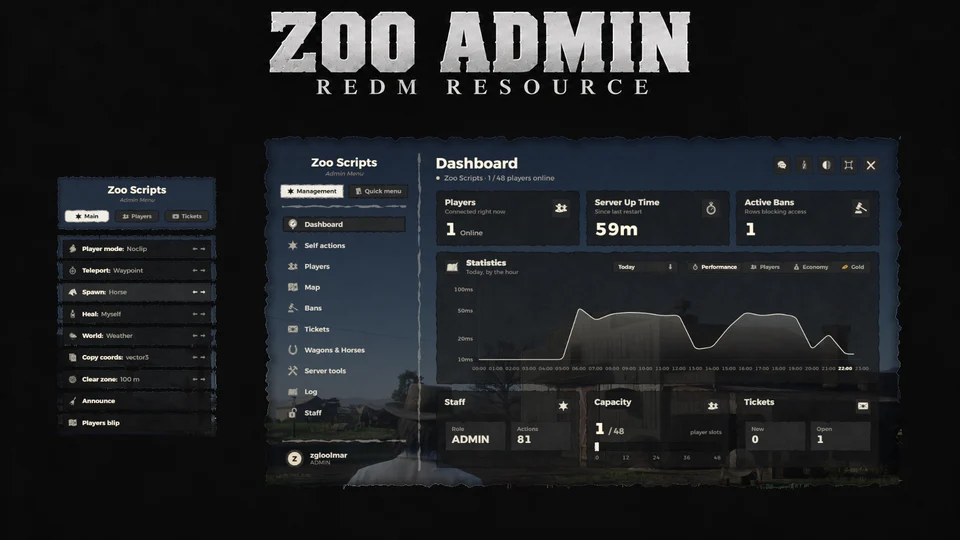
The staff panel for VORP, RSG and TPZ. One panel for the players, a live map, bans, tickets, the staff and the server's own tools, with a quick menu at the side of the screen while you play.
▶️ Watch the showcase on YouTube
Requirements
- One framework: VORP, RSG or TPZ (its core and its inventory)
oxmysql- OneSync on
weathersync, only for the Weather & time button
Install
Put the
zoo_adminfolder inresources/[zoo]/.Add these lines to
server.cfg, after your framework andoxmysql:iniensure zoo_admin add_ace resource.zoo_admin command.quit allowThe second line lets the Restart button close the server at the end of its countdown (txAdmin starts it again).
OneSync must be on:
iniset onesync onMake yourself an admin in
config/config.lua, underConfig.Admins, in one of these ways:your license or your Steam, in its
licenseorsteamlines, one per line;a Discord role id, in its
discordlines (then turn onConfig.Discordwith your bot token and guild id);or ACE, in
server.cfg:iniadd_ace group.admin zoo_admin.admin allow
Start the server. The database tables are made on the first start (
sql/zoo_admin.sqlholds the same, if you prefer to run it yourself).Join and press Page Down, or type
/adminmenu.
Config.Framework is 'auto': the framework that runs is found by itself. Name it ('vorp', 'rsg' or 'tpz') only if you run more than one.
Keys and commands
| Key or command | What it does |
|---|---|
Page Down, or /adminmenu | opens the panel |
Page Up, or /zmenu | opens and closes the quick menu |
/report | a player asks the staff for help: a ticket |
The keys and the commands are in config/config.lua (Config.OpenMenu, Config.OpenCommand, Config.SmallMenuKey, Config.SmallMenuCommand, Config.ReportCommand); the other chat commands' names are in config/commands.lua.
Staff
Admins have every button, and the Staff page to give the others theirs. A staff member is added in the game, on the Staff page: for every character of an account or for one character, with exactly the buttons they need, even a single one. Staff groups keep a set of buttons under a name, so a whole team changes at once. With Config.ProtectHigherRoles on, staff can do nothing to an admin but Heal and Notify.
What is in the panel
- Dashboard: who is online, uptime, bans and tickets, and a live chart of performance, players, the economy and gold. The panel can be made bigger or smaller, see-through, and rolled into a bottle in the screen's corner.
- Self actions: noclip, god mode, invisibility, a free camera, golden cores, super jump, any ped model (even an animal), hide the HUD, cinematic bars, announcements.
- Players: online and offline. A player's card has teleport, bring, spectate, freeze, cuff, their satchel, money, items, weapons, a job, a group, experience, fun (lightning, fire, sky drop, a fake Windows update), warnings, admin jail with prison clothes, kick and ban. An offline player can still be banned, paid or given a job.
- Map: every player live on it, a click to act on them or to teleport, the game's own map painted in any colour for everyone, fire painted onto the world, and blips of your own on every player's map.
- Bans: the player's account, and with
Config.BanHardwaretheir PC too. Every ban has a code the player can give you; unbanned ones stay as records. - Tickets:
/report, a chat with the player, Take sends you to them and Solve sends you back. - Server tools: weather and time for everyone or just you, a song for the whole server or around you, copy coords, and a restart with a countdown everyone sees (or automatic restarts at set hours).
- Log: every action, who did it, to whom and when, with an optional Discord webhook.
- Quick menu: its own page sets what it holds, where it sits on the screen, its size and how see-through it is.
Settings
config/config.lua holds them all, each with its own comment:
- the framework, the language and the server's name on the panel
- the admins
- the panel's key and command, walking while it is open, the bottle
- the quick menu, its key and command
- the noclip keys and speeds
- the webhook, Discord roles and the whitelist
- warnings before an automatic ban
- tickets
- the admin jail's place and the release point
- restarts, weather and music
- lightning damage and the most fire spots at once
- the horses, wagons and weapons lists (
config/horses.lua,config/wagons.lua,config/weapons.lua)
The language files are in locales/ (English and Arabic); a new language is one more file there.